How to get kurti model photos without a photographer
By the Vastra Studio team · Updated
You can get kurti model photos without a photographer in three ways: hire a freelance model and shoot at home, use a mannequin or ghost-mannequin edit, or upload one flat photo to an AI tool that shows the kurti on a model. AI is fastest and cheapest per design, but you must check every photo.
Why model photos matter for a kurti
A kurti flat on a bed shows the print but not the length, fall or fit. A buyer scrolling a marketplace pauses on a photo of the kurti being worn. That is why sellers try to get model photos for every design, and why it gets expensive when you add 20 or 50 designs a month.
The three ways
1. Hire a model and shoot yourself
You book a freelance model, find a plain wall and good window light, and shoot with a phone. This gives the most real result, including how the fabric moves. The cost is the model's fee, your time, and the need to repeat it for every new design. Prices vary by city and model, so get two or three quotes before you plan a budget.
2. Mannequin or ghost-mannequin photos
You put the kurti on a mannequin and shoot it. It shows the shape, and costs only the mannequin and your time. It looks less lively than a person, and sleeves and hems can sit oddly on a mannequin.
3. AI model photos from a flat photo
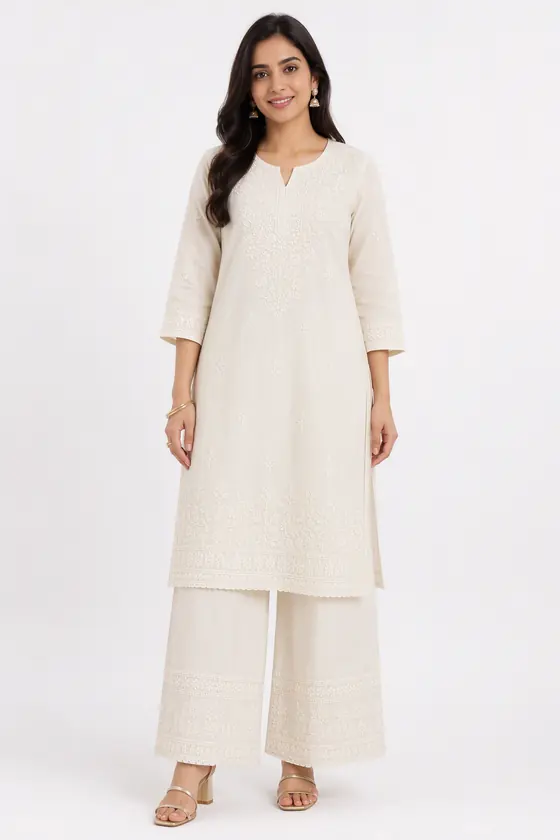
You upload one flat photo and an AI tool shows the kurti on a generated model. With Vastra Studio this takes about 30 to 40 seconds a photo and costs 1 credit. Sign in and your first 2 photos are free. The models are AI-generated, not real people.
What a good AI result looks like
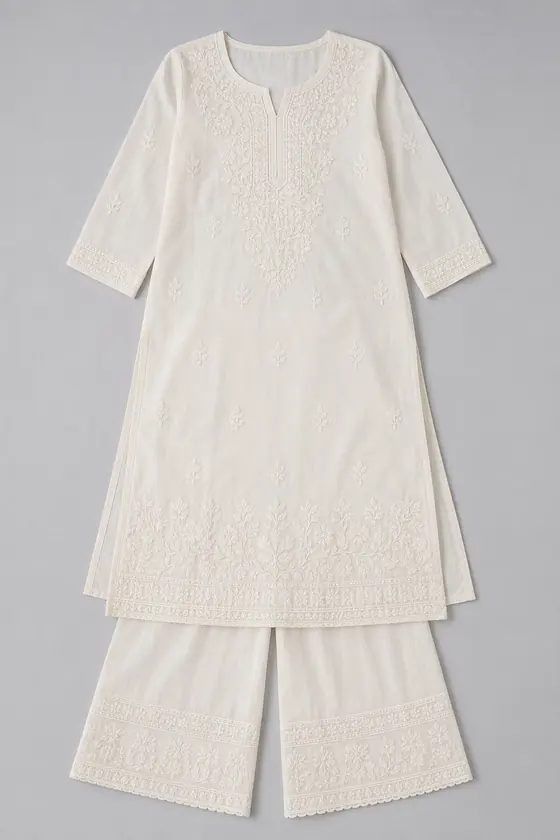
Compare the two photos above: the notch neckline, the sleeve length and the palazzo match the flat photo, and the embroidery layout looks the same at this size. That is the standard to hold every result to: neckline, sleeves, print and every piece worn.
Where AI model photos fail
- Added pieces. In one of our own tests, an editorial look added a dupatta that was not in the flat photo. If your listing does not include a dupatta, do not use that photo.
- Fine detail. Very small prints, thread work and zari can be simplified.
- Neckline and sleeves. Check them first. Buyers notice a changed neckline immediately.
The rule we give every seller: compare every photo with the real garment, and keep one real photo of the print or embroidery in the listing.
How to do it with Vastra Studio
- Take a flat, full, evenly lit photo of the kurti on a plain background (how to shoot it).
- Upload it, pick women and the kurti type, choose a model and the looks.
- Check each result against your kurti and download the ones that match.
See the full page: kurti model photos with AI.
Questions
- Can I get model photos of a kurti without a model?
- Yes. Upload a flat photo to an AI tool such as Vastra Studio and it shows the kurti worn by an AI-generated model. You still need to check each photo against the real kurti.
- Is a mannequin cheaper than a model?
- Usually yes, because you pay once for the mannequin and shoot yourself, but the photos look less lively and sleeves and hems can sit oddly.
- What can go wrong with AI model photos?
- The AI can add a piece that is not in your photo, such as a dupatta, or simplify fine print and embroidery. Compare every photo with the real garment.
- How many photos do I get per upload?
- You choose up to three looks per upload (white studio, outdoor, editorial). Each look is 1 credit.